
BYOK/ BYOM: Bring your ChatGPT subscription or API key
Connect your ChatGPT subscription or OpenAI/Anthropic API key to chat in Anima Playground without using Anima AI credits.
Bring your own model to Anima Playground. Connect your ChatGPT subscription, or add an OpenAI/Anthropic API key, and your Playground chats run on the model access you already pay for.
Free chat: bring your ChatGPT subscription or API key
Anima Playground lets you chat, iterate, and vibe code with your own LLM access.
If you connect your ChatGPT subscription or add your own OpenAI / Anthropic API key, Anima does not charge AI credits for chat messages. Your model usage runs through the account or key you bring.
Other Anima features may still require a paid Anima plan or usage, including cloning websites, design-to-code, image-to-code, hosting, team features, and other product capabilities. But the core chat loop can run on your own model access, so you can keep iterating without watching Anima AI credits disappear.
Why this matters
Vibe coding works best when you can keep exploring. A useful project rarely happens in one prompt: you ask, refine, test, fix, and ask again.
When every message is tied to a credit meter, you start rationing prompts. You stop trying the extra idea. You ship the first draft instead of pushing the product until it feels right.
Free chat with your own model removes that friction: you pay the model provider once, then use Anima as the Playground, agent loop, and app-building environment around it.
What you can connect
You can use either of these options:
- ChatGPT subscription — connect your OpenAI account and use your ChatGPT/Codex-enabled subscription for Playground chat.
- OpenAI API key — paste your own OpenAI API key. Usage is billed by OpenAI to that key.
- Anthropic API key — paste your own Anthropic API key. Usage is billed by Anthropic to that key.
Choose the setup that matches how you or your team already pays for AI access.
How to connect your own model
Step 1: Open Playground settings
In Anima Playground, open the workspace/team settings from the left sidebar.
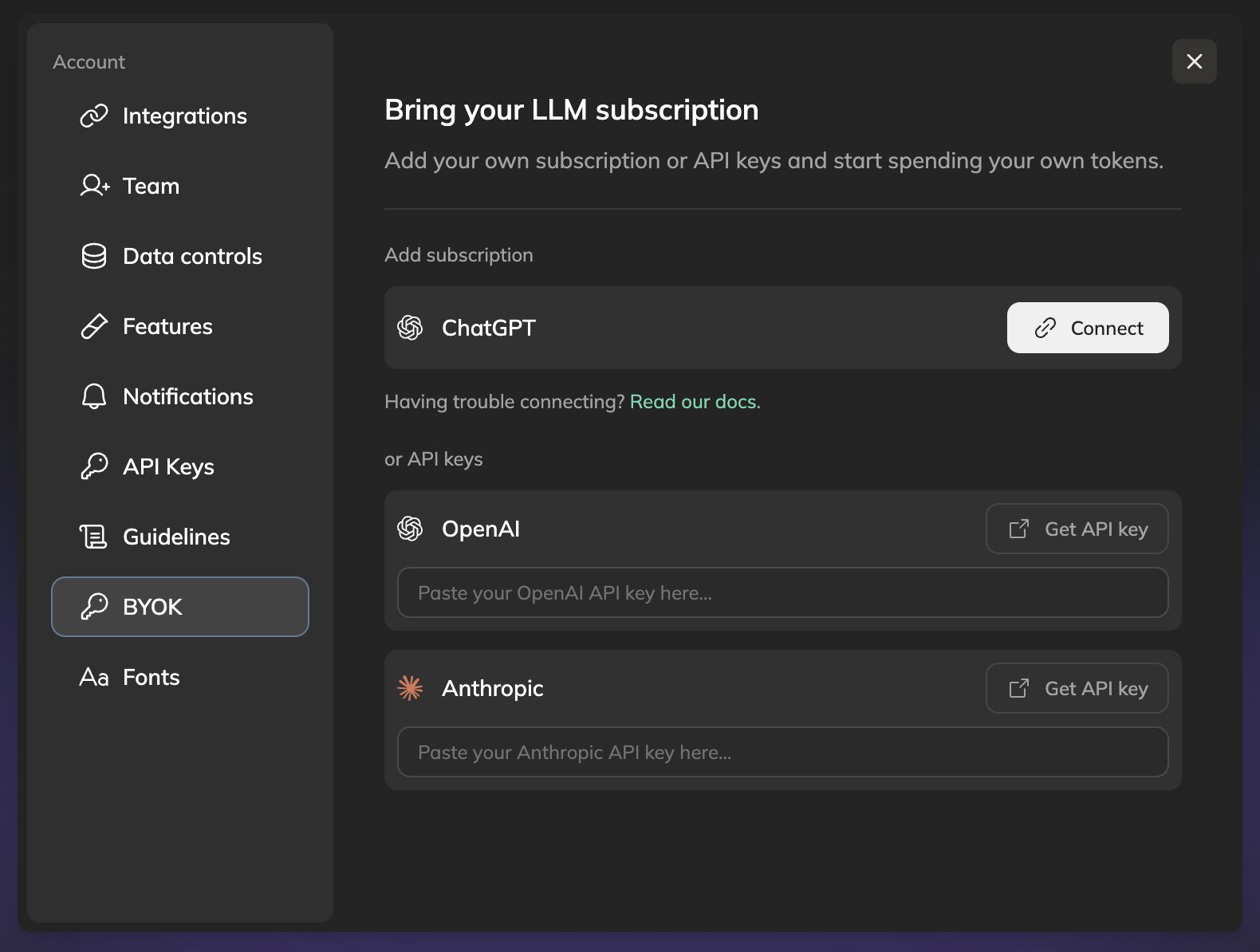
Step 2: Go to BYOK
In the settings menu, select BYOK.
BYOK means Bring Your Own Key. This is where you can connect a ChatGPT subscription or paste an API key.
Step 3: Connect ChatGPT, or add an API key
You have two paths:
Option A: Connect ChatGPT
Under Add subscription, click Connect next to ChatGPT. Anima will open the OpenAI connection flow. Follow the login and pairing instructions to authorize Anima to use your ChatGPT/Codex-enabled subscription for chat.
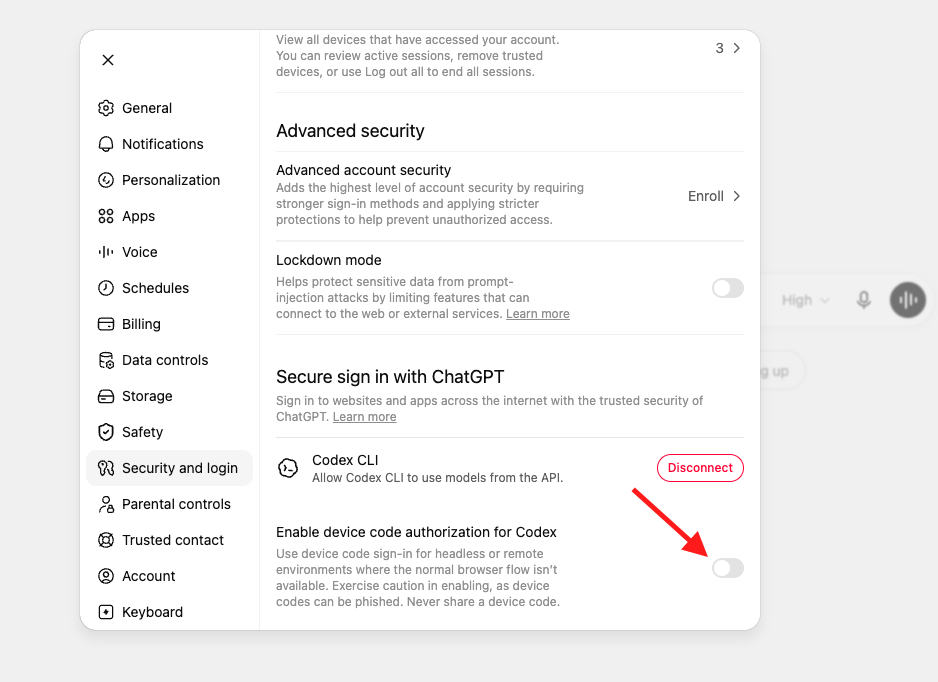
If the connection flow asks you to enable device code authorization for Codex, open ChatGPT settings and enable it first: Settings → Security and login → Enable device code authorization for Codex.
Option B: Add an OpenAI or Anthropic API key
Under API keys, paste your OpenAI or Anthropic API key into the matching field.
Use this option if your team manages AI usage through company-owned API keys or prepaid credits.
Step 4: Start chatting
Once connected, return to Playground and keep building. Your chat messages now run on the model access you connected instead of consuming Anima AI credits.
What is free, and what is still paid?
Free with your own model access:
- Chat messages in Anima Playground
- Iteration prompts while vibe coding
- Agent conversations powered by your connected ChatGPT subscription or API key
Still part of Anima plans or usage:
- Website cloning
- Design-to-code
- Image-to-code
- Hosting and publishing
- Team/workspace features
- Other paid Anima product capabilities
The idea is simple: pay for tokens once. You bring the LLM; Anima brings the Playground, app-building workflow, design context, orchestration, and infrastructure.
Troubleshooting
I cannot connect ChatGPT
If the ChatGPT connection fails, check whether device code authorization for Codex is enabled in your ChatGPT account:
- Open ChatGPT.
- Go to Settings → Security and login.
- Enable device code authorization for Codex.
- Return to Anima Playground and start the connection again.
Should I use ChatGPT or an API key?
Use ChatGPT if you already have a personal subscription and want the simplest setup.
Use an API key if your team already buys OpenAI or Anthropic credits centrally, or if you need usage to bill to a company account.
Will Anima see my API key?
Only add keys inside the official Anima settings screen. Treat API keys like passwords: never paste them into a chat message, public doc, screenshot, or shared workspace.
Updated 3 months ago