
Github
Push your Playground code to any GitHub repository.
How it works
This is a one-way push integration. You can push code from Anima to GitHub, but changes made in GitHub won't sync back to Anima.
What this means:
- ✓ Push your Playground code to a new or existing repo
- ✓ Create commits directly from Anima
- ✓ Keep your code backed up in version control
- ✗ Changes made in GitHub won't appear in Playground
- ✗ Pull requests and merges happen outside Anima
If you need to continue working on code that was modified in GitHub, clone the repo locally or re-import it into a new Playground project.
Connecting GitHub
- Open the left panel and click the cogwheel icon next to the team name
- Navigate to Integrations
- Select your Token Type
- Enter your Access Token
- Click Connect
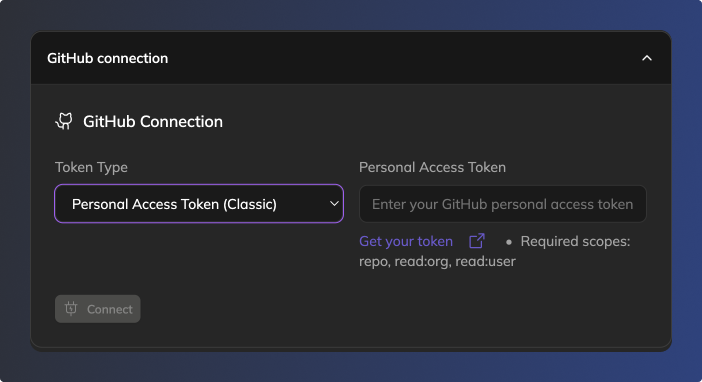
Generating a GitHub personal access token
- Go to your GitHub account and click on your profile picture in the top-right corner
- Navigate to Settings → Developer settings → Personal access tokens
- Click Generate new token (or Generate new token (classic))
- Provide a name for the token (e.g., "Anima Playground Token")
- Select the necessary scopes (see below)
- Click Generate Token
- Copy the token immediately — you won't be able to view it again
- Paste the token into Anima Playground's GitHub Connection settings and click Connect
Required scopes
Classic tokens need:
reporead:orgread:user
Fine-grained tokens require:
- Codespaces lifecycle admin (read-only)
- Contents (read and write)
- Metadata (read-only)
Security note: Treat your personal access token like a password. Never share it publicly.
Updated 10 months ago
Did this page help you?