
App Users
Users
View and manage everyone who has signed up for your app. The Users section shows all registered accounts.
In this guide:
The user list
Access user management by clicking the Data icon in the top bar, then selecting Users in the sidebar.
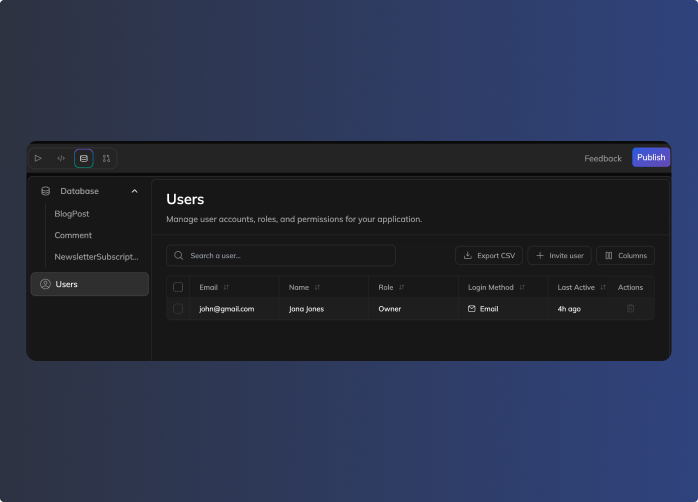
The user list shows:
| Column | What it shows |
|---|---|
| User's email address | |
| Name | Display name |
| Role | Account type (Owner for you, user for others) |
| Login Method | How they sign in (Email, Google, etc.) |
| Last Active | When they last used the app |
| Actions | Delete user |
Searching users
Use the search bar to find users by email or name. Helpful when your app has many users.
Customizing columns
Click Columns to show or hide specific columns in the list.
How users sign up
Your app has open signup — anyone can create an account. When someone visits your published app, they can sign up directly using the available login methods.
You (the Owner) appear in the user list automatically. As users sign up, they're added to the list.
Login methods
Users can sign in to your app using different methods:
| Method | Description |
|---|---|
| Email and password | |
| Sign in with Google account | |
| GitHub | Sign in with GitHub account |
Login methods are configured in your project settings. Users see the available options on your app's sign-in page.
Managing users
Exporting users
Click Export CSV to download your user list as a spreadsheet. Useful for:
- Keeping records
- Analyzing user data
- Migrating to another platform
Deleting users
Click the trash icon in the Actions column to remove a user. This:
- Removes their account from your app
- Prevents them from signing in
- Does not delete records they created (those remain in your database)
⚠️ Heads up: Deleting a user is permanent.
Quick reference
| Task | How to do it |
|---|---|
| View users | Data tab → Users section |
| Find a user | Use the search bar |
| Change columns | Click Columns button |
| Export user list | Click Export CSV |
| Remove a user | Click trash icon in Actions |
Updated 3 days ago